Explore with the Inspector
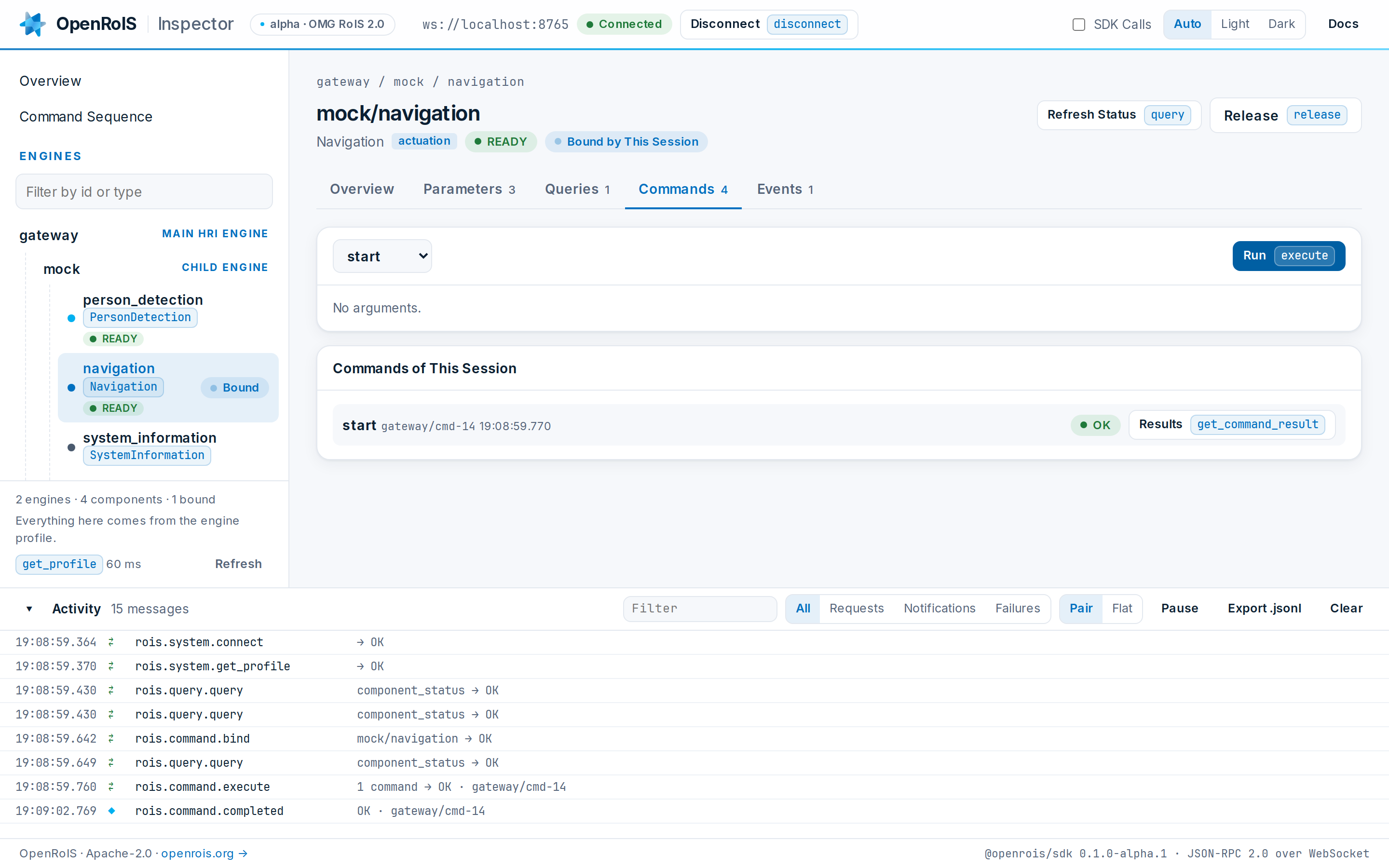
The OpenRoIS Inspector is a service application for the browser. It connects to a gateway, shows the engines behind it and their components, and drives them the way your own application would, with every JSON-RPC message of the session in view. Use it to learn RoIS, to check an adapter you are writing, and to find the calls your application needs.
Run It
The Inspector ships with the Docker Compose stack of the repository, next to a gateway and a mock adapter. With Docker and nothing else installed:
git clone https://github.com/openrois/openrois.git
cd openrois
docker compose up --build
Open http://localhost:8080/?autoconnect=1. The
Inspector connects to the gateway on ws://localhost:8765.
To inspect another gateway, enter its URL on the connect screen, or open the page with
?url=ws://host:port. The Inspector remembers the last gateway it reached. A page served
over http can reach a ws:// gateway on the same machine or network. It cannot reach
one from a page served over https.
What It Shows
| Area | What you do there |
|---|---|
| Overview | See the main HRI Engine you reached and what the session listens for, then try the stack with guided cards: read a position, watch for people, drive to a target, and open an example sequence. The cards find components by RoIS type, so they work against any gateway that has them. |
| Engines | The main HRI Engine, its child engines and the HRI Components each one hosts, with their type, function, status, and whether this session holds them. The tree follows rois.system.profile_changed, so an adapter that joins or leaves appears at once. |
| Component | Its profile, its parameters, its queries with their arguments, its commands followed to rois.command.completed, and its events. Every button names the RoIS method it calls. |
| Command Sequence | One rois.command.execute built from commands in order and concurrent groups whose branches run at the same time, each step with arguments and a delay. The Inspector shows the exact request and follows every command id to its completion. |
| Activity | Every request, response and notification of the session. Filter by method or component, pause, export the session as JSON Lines, and open a row to its raw JSON-RPC. |
Nothing in the Inspector is specific to a robot: every form comes from the component profiles. It has a light and a dark theme.
From the Inspector to Your Code
With SDK Calls on, each view also shows the @openrois/sdk code that does the same,
ready to copy. A typical path:
- Find the component in the engine tree and read its profile.
- Run the query, the command or the sequence you need until it does what you want.
- Copy the SDK calls into your application, and continue with write a service application.
The Activity log shows the same exchange as raw JSON-RPC, which is what you need to speak RoIS from a language without an SDK. See the wire protocol.
Check an Adapter
Start your adapter against the gateway of the stack. It appears in the engine tree as a
child engine as soon as it connects. For each component, check that the profile lists
what you implemented, that queries answer, that commands end with the status you expect,
and that events arrive after subscribe. See
write components and an adapter.